
Download Banner Studio – poster maker, banner maker, design tool, mobile app, template library, social media graphics, video creation, thumbnail design
Overview
Banner Studio – Poster Maker is a mobile application tailored for Android users seeking an efficient and creative way to produce customized posters for personal and professional use. Designed to simplify the design process, the app enables users to craft visually engaging content for events, promotions, and digital sharing. It serves as a go-to solution for individuals and small businesses needing quick, high-quality graphics without requiring advanced design skills.
The software is particularly suited for shop owners, digital marketers, content creators, and event planners who rely on timely, eye-catching visuals. With access to over 50,000 high-definition templates, users can choose from a wide variety of designs tailored to different themes and occasions. These include festival posters, birthday announcements, business advertisements, and social media graphics.
The app supports full customization, allowing users to insert personal photos, logos, and text to match their branding or message. Real-world use cases include promoting local events, launching product campaigns, or creating shareable content for Instagram and Facebook. The developer did not provide additional information about the company background or development philosophy.
Key Features & Capabilities
- Extensive Template Library: Over 50,000 high-definition templates available for instant access, covering events, promotions, and digital content.
- Full Customization Tools: Users can add personal photos, logos, text, and adjust colors, fonts, and layout to tailor designs to their needs.
- Daily Template Updates: Fresh designs are added regularly, ensuring users always have access to current and trending visual styles.
- One-Click Download & Share: Simplified export functionality allows users to save or share posters directly to social media platforms.
- Video Creation Support: Beyond static posters, the app includes tools for creating short promotional videos and animated thumbnails.
- Multi-Platform Compatibility: Designed for mobile use with output formats suitable for social media, print, and digital distribution.
These features empower users to create professional-looking graphics without prior design experience. For example, a small business owner can quickly generate a birthday sale poster using a pre-designed template, insert their logo, and share it on Instagram within minutes. Similarly, a content creator can produce a thumbnail for a YouTube video using a trending layout and customize it with their channel’s branding. The app’s workflow is optimized for speed and ease, minimizing steps between concept and final output. The developer did not specify technical details about the template rendering engine or video processing capabilities.
User Interface, Workflow & Performance
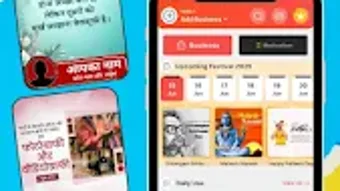
Banner Studio features a mobile-optimized interface designed for intuitive navigation on Android devices. The layout is structured around a central dashboard that provides quick access to templates, recent projects, and customization tools. Users can browse categories by occasion, industry, or design style, with visual thumbnails facilitating fast selection.
The workflow is linear and user-friendly: choose a template → customize elements → preview → export. The app’s design prioritizes accessibility, with large touch targets and clear icons, making it suitable for users with minimal design experience. Navigation between editing tools is smooth, and the interface responds promptly to touch inputs.
Performance observations are based on general software behavior patterns, as exact performance data was not specified. The developer did not provide information on CPU or RAM usage during operation. Stability during extended use was not detailed, but the app’s lightweight nature suggests consistent performance on modern Android devices.
No reported crashes or freezes were mentioned in the provided input.
Compatibility & System Requirements
Banner Studio is designed exclusively for Android operating systems. The app is available in version 1.0.2 and has a file size of 100 MB, indicating a lightweight installation footprint. It is optimized for mobile devices, with no mention of compatibility with tablets or other platforms.
The developer did not specify exact system requirements such as minimum Android version, processor type, or RAM capacity. Compatibility information was partially provided, with no details on whether the app supports older Android versions or requires specific hardware features like GPU acceleration. The installation size suggests it is suitable for devices with moderate storage capacity.
Users should ensure their device meets standard Android app requirements for smooth operation. The developer did not provide additional information about hardware or software prerequisites.
Pros and Cons
Pros
- Large library of over 50,000 high-definition templates for diverse use cases
- Simple, intuitive interface ideal for beginners and non-designers
- Supports full customization with photos, logos, and text
- Regularly updated templates keep designs fresh and relevant
- Includes video creation and thumbnail design tools beyond basic posters
- Free to download and use with no upfront cost
Cons
- Availability limited to Android devices only
- Exact system requirements were not listed
- Resource usage during operation was not disclosed
- No information on offline functionality or cloud sync
- Limited to mobile platform; no desktop or tablet version available
FAQ Section
Is Banner Studio available for iOS devices?
The app is currently available only for Android users. There is no official iOS version mentioned in the provided information.
Can I use Banner Studio without an internet connection?
While the app may allow access to previously downloaded templates, the developer did not specify whether full functionality is available offline. Initial template browsing and downloads likely require an internet connection.
Is Banner Studio safe to download and use?
Banner Studio is available for free download on the Google Play Store, which is a secure platform. However, users should ensure they download from official sources to maintain security.
How often are new templates added?
The app features daily updated templates, ensuring users have access to fresh and trending design options regularly.
Does Banner Studio offer a desktop version?
Based on the provided information, Banner Studio is a mobile application and does not have a desktop or PC software version available.
Final Thoughts + CTA
Banner Studio – Poster Maker stands out as a versatile and accessible tool for Android users who need to create professional-quality graphics quickly and efficiently. Its extensive template library, combined with intuitive customization features, makes it a strong choice for small business owners, marketers, and content creators. The inclusion of video creation and thumbnail design tools adds significant value beyond basic poster-making.
While the app is limited to Android and lacks detailed technical specifications, its user-friendly design and free access make it a compelling option for mobile-first users. The absence of system requirements or performance data is a minor drawback, but the app’s lightweight size and mobile optimization suggest broad compatibility. For anyone seeking a fast, secure, and easy-to-use design tool, Banner Studio delivers on its promise.
Download Banner Studio now.





.png)

